The VIGILANT® Battery Monitoring system receives periodic updates which can be installed by the end user. Updates are installed on the VIGILANT® Monitor via the Web-Interface. As of version 1.3.14, each system must be updated directly on the web-interface sequentially. This means if updating from 1.3.11 to 1.3.14, you must first update from 1.3.11 through 1.3.13 first.
Eagle Eye Power Solutions also offers a service to perform updates. If interested, please request a quote.
Update Instructions
Estimated Time Required: 00:10:00 – 00:45:00
The following update instructions apply to all versions since 1.3.7. Please note that example screenshots may show a different version that what is shown on your version.
Step 1: Confirm Current Version
- Prior to obtaining the update file(s), the current software version must be verified to ensure the correct update file is used.
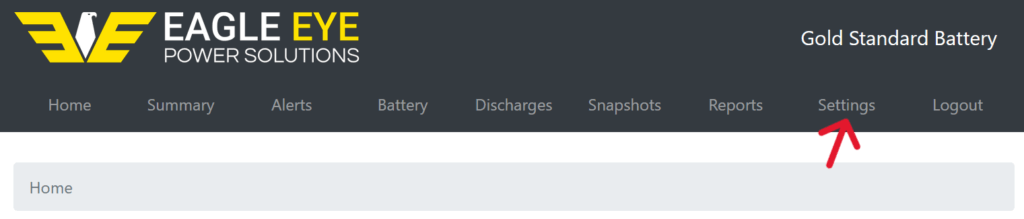
- Login to the VIGILANT® web-interface and open the Settings page by clicking Settings on the web-interface header.
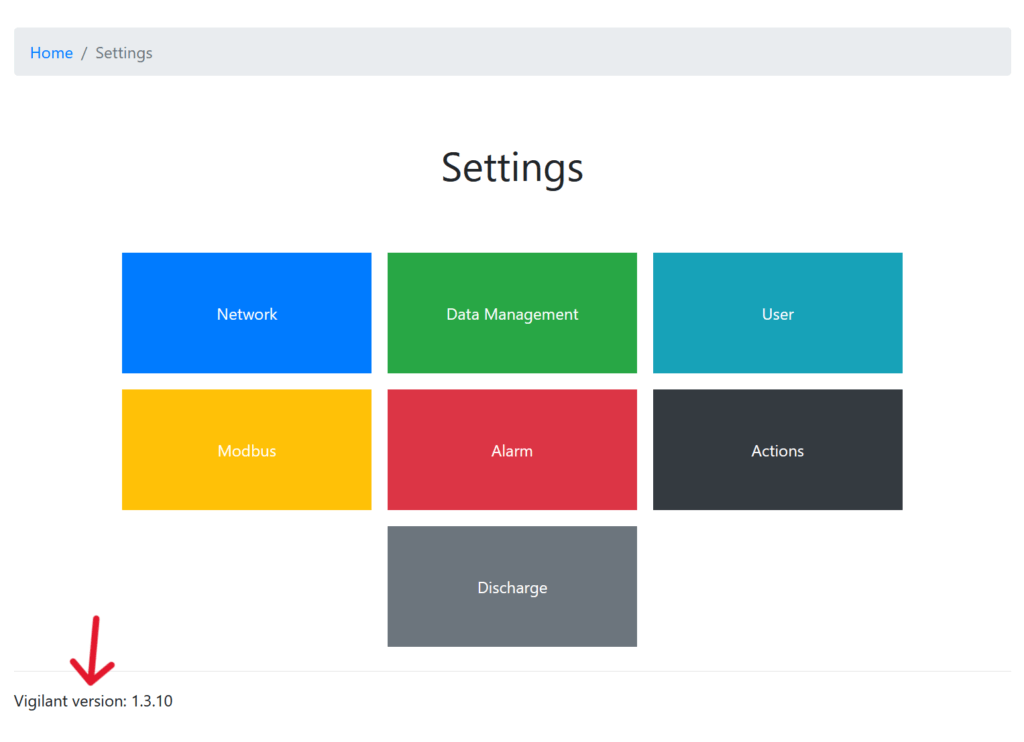
- On the lower left under the buttons, check to confirm the current software version as shown below.
Step 2: Download Update File(s)
NOTE: Updates must be done sequentially, you cannot skip versions. For example, if updating from 1.3.11 to 1.3.14, you must first update from 1.3.11 to 1.3.13.
- Click the version needed to expand its contents. A download link will be available as well as the release date and major changelog details. Download the update file to an easily accessible location (e.g., Downloads folder).
- After downloading the update zip file, do not extract it. The entire zip file will be uploaded to the web-interface.
Step 3: Upload Update File
- Navigate to the Settings page, click the Actions button then click the Update button.
- When the Update page loads, the following information may be present:
- System version: Should match the version shown on the Settings page.
- Newest stable version: If the VIGILANT® has connection to the internet, it will clarify what the newest stable version is (e.g., 1.3.10)
- Available space: The available space left of the SSD.
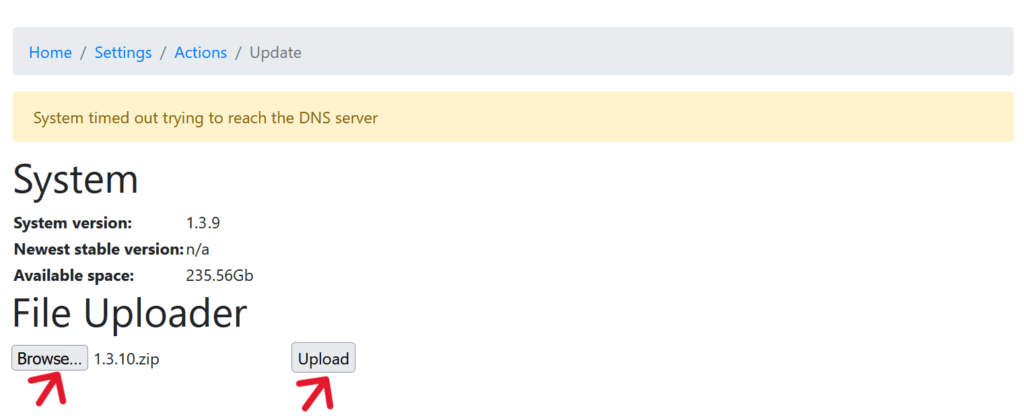
NOTE: The page might display a message that “System timed out trying to reach DNS server”. This will occur if the system is not connected to a DNS, it does not affect the update procedure.
- On the Update page, click the Browse… button and select the update zip file (note, the zip file extension may not be visible on all computers. The file should be located wherever it was saved previously (e.g., Downloads folder).
- After selecting the file, it should show the correct version next to the Browse… button. If so, click the Upload button to start the update.
- When the upload starts, it will progress through 14-16 stages automatically. The progress of these stages will be shown as a blue notification bar on the top of the page.
- When the update is completed, the notification bar will turn green and confirm the update was completed successfully.
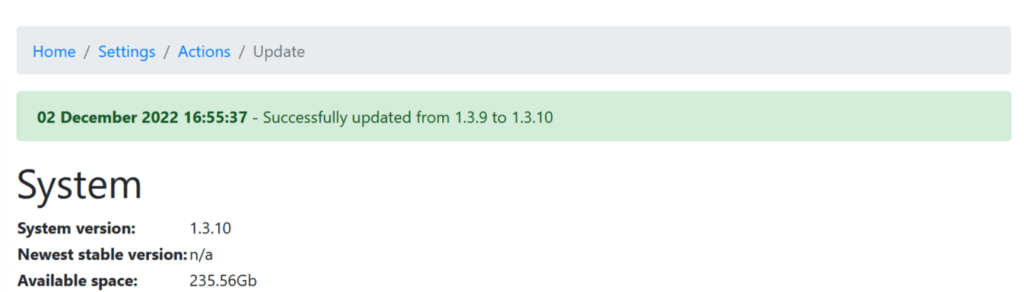
- After the update is complete, be sure to reboot the monitor from the
Settings/Actions/Reboot/page. - Should the update fail for any reason, please Contact Eagle Eye Power Solutions directly.
Downloads
Select the version below to reveal the link to the version detail page and changelog information.
Version 1.3.14
Released August 1, 2026
Features
- Improved protection for measurement jobs to help ensure only completed measurement data is processed and stored.
- Improved External Relay Box command validation and confirmation, including additional checks to verify relay responses match the requested command.
- Improved PEEL and report-file generation to better handle missing storage locations, incomplete requests, and report-generation errors.
- Added additional software dependency records to support future troubleshooting, serviceability, and repeatable release preparation.
Fixes
- Improved coordination between background measurement and controller services to reduce the chance of incomplete readings or database conflicts.
- Improved recovery from temporary database conflicts during normal system processing.
- Disabled a monthly raw-data cleanup process that could conflict with scheduled measurement activity.
- Improved handling of scheduled and manual measurement jobs so temporary measurement records are closed properly if an error occurs.
- Improved Device Management and installer checks for CT sensors, ERB relay responses, pulse-current setup, and sensor ID reset commands.
- Improved software update recovery when system service controls are temporarily unavailable during the update process.
- Reduced unnecessary background processor and database activity while the system is idle.
- Improved editing of existing user accounts that were created under older software role definitions.
- Improved data handling to reduce the likelihood that incomplete or pending measurement activity affects stored history or system performance.
Other
- This release primarily focuses on system reliability, update resilience, report generation, and serviceability.
- Updated internal post-update handling and diagnostic logging for this release.
- Expanded internal test coverage for updated reliability paths, including measurement cleanup, ERB verification, relay validation, strap-current behavior, and scheduled cleanup handling.
Version 1.3.13
Released July 26, 2026
Features
- Added system monitoring to identify repeated incomplete strap-current readings and record the condition in the audit trail.
- Improved system time configuration during software updates and commissioning to reduce scheduling and data-processing inconsistencies.
Fixes
- Improved the reliability of scheduled sensor communication and device-management operations.
- Improved database recovery following interrupted or unsuccessful system tasks.
- Reduced unnecessary processor, database, and storage activity during normal system operation.
- Improved the handling of incomplete or pending sensor readings so calculations can continue without disrupting other system functions.
- Improved the reliability of battery-current, strap-current, resistance, ground-fault, and discharge calculations.
- Improved dashboards, reports, exports, and alarm pages when required readings have not yet been received.
- Improved the reliability of ELM and External Relay Box commands and scheduled relay-status checks.
- Improved system-update sequencing to reduce the possibility of database conflicts during installation.
- Improved calibration validation when required sensors or readings are unavailable.
- Improved commissioning and Device Management behavior when sensor information is incomplete or unavailable.
- Corrected an issue affecting the storage of aggregated maximum values.
- Added cleanup and correction of certain incomplete task records created by earlier software versions.
Other
- This release primarily focuses on system stability, data integrity, and long-term reliability.
- Updated internal diagnostic logging to provide additional information for technical support.
Version 1.3.12
Released April 1, 2026
Features
- Added support for Current Transformer (CT) sensors for monitoring float current and battery charge/discharge activity. Up to eight CT sensors can be supported per system.
- Added support for the External Relay Box (ERB).
- Replaced the ELM Management page with an expanded Device Management page for managing ELMs, CT sensors, and External Relay Boxes.
- Added the ability to manage user accounts after system commissioning, including administrator roles, account activation, and password management.
- Improved the performance and display of historical charts.
- Added a Downloads page for viewing, downloading, and deleting generated reports and exports.
- Reports and exports are now generated in the background, allowing continued use of the web interface during generation.
- Added the ability to specify the primary NTP server used for system time synchronization.
- Updated NERC reports to include the monitor serial number and sensor communication alarms.
- Added visual indicators for active alarms and warnings on metric snapshot pages.
- Added commissioning warnings for unsupported sensor firmware and non-standard system configurations.
- Updated the Modbus mapping document.
Fixes
- Improved overall system stability and data handling to reduce the likelihood of data corruption.
- Corrected several system time and clock-setting issues.
- Improved the reliability of sensor and ELM management functions.
- Corrected issues affecting NERC and discharge report generation.
- Improved the accuracy and display of historical charts, resistance values, and communication statistics.
- Improved system reset behavior and reduced the possibility of user-access issues during a reset.
- Corrected various display, labeling, and interface issues.
Other
- New passwords must contain at least 12 characters and cannot match commonly used passwords. Existing passwords remain valid.
- System resets are now restricted to administrator accounts.
- Removed the stand-off connection float-current calibration option. Existing calibration values are retained.
- Updated several internal software components and security settings.
Version 1.3.11
Released July 31, 2023
Features
- Enhanced the existing continuity alarming functionality to utilize the critical relay. Also added a dedicated Modbus data point to store continuity state.
- Added new registers in the Modbus mapping to assist customers with configuring their Modbus clients.
- ELM management functionality is now accessible from the root settings page.
- Added a diagnostic section in settings to provide Eagle Eye engineers daily summary data.
- Added interconnect resistance alarm thresholds.
- Updated the NERC and monitor reports to display the alarm states.
- Added lower end internal resistance alarms.
- Added alarm for if a sensor is unable to communicate or is unplugged.
- The rightmost value on the x-axis for line charts will be the current time. This makes it easier to determine if a metric is not being collected.
- Charts will more clearly display missing data.
- Changed how Modbus handles data it cannot coerce into the correct format. It will now return 65535 (assuming an unsigned 16 bit integer) rather than 0.
Fixes
- Reduced the likelihood of battery voltage spikes (from creating nuisance alarms).
- Fixed an issue where the system would stop displaying updated data (i.e., “flatlining”)
- Fixed an issue when the system clock is updated by less than a day, and the schedule reset button could result in an Internal Server Error.
- Global alarm settings will display a success message when successfully updating the thresholds.
- Fixed an issue that could result in the Vigilant not saving readings originating from the serial bus.
- Other various small fixes and improvements.